How to Book for Motor Vehicle Inspection (Step-by-Step Guide)
Booking for motor vehicle inspection through the NTSA portal on eCitizen is a quick and convenient process. You can pay the inspection fee online, choose your preferred inspection center, and schedule an inspection date without visiting an NTSA office.

Whether you’re booking an annual inspection or another type of vehicle inspection, this guide will walk you through every step. For any help with this just contact me or send a WhatsApp message.
Steps How to Book a Motor Vehicle Inspection
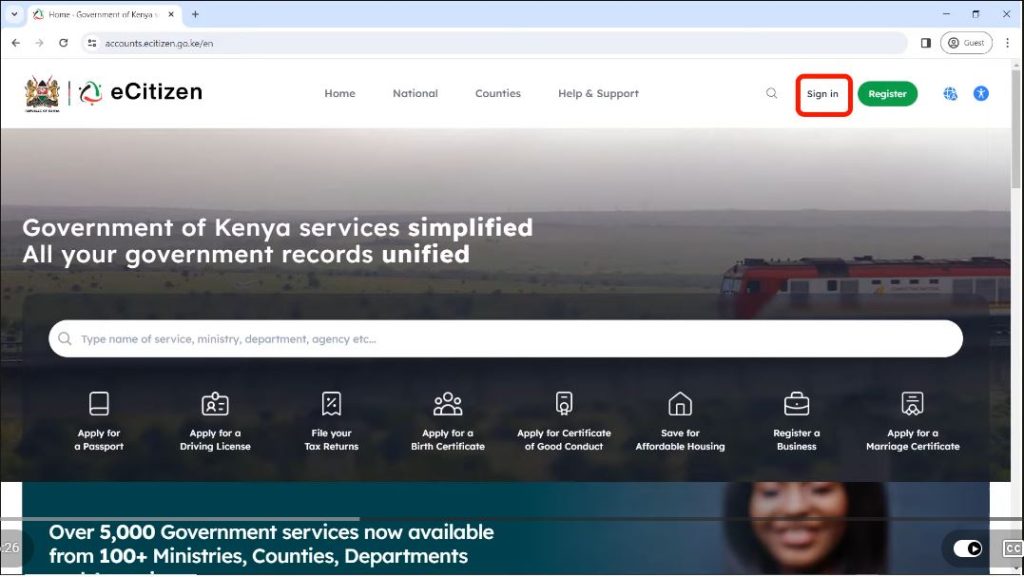
Step 1: Visit the eCitizen Portal. Open your preferred web browser, such as Google Chrome, Microsoft Edge, or Mozilla Firefox, and visit the official eCitizen website. On the homepage, click Sign In.
Step 2: Sign In to Your eCitizen Account. Enter your eCitizen login credentials. You can sign in using either your registered email address and password or your National ID number and password. Once you’ve entered your details, click Sign In.
Step 3: Verify Your Account Using an OTP. For security purposes, eCitizen will require you to verify your identity using a One-Time Password (OTP). Choose whether you’d like to receive the OTP via your registered mobile phone number or email address. Enter the OTP once you receive it, then click Next.
Step 4: Confirm Your Account Details
After logging in, confirm that the displayed account belongs to you. If all the information is correct, continue to the next step.
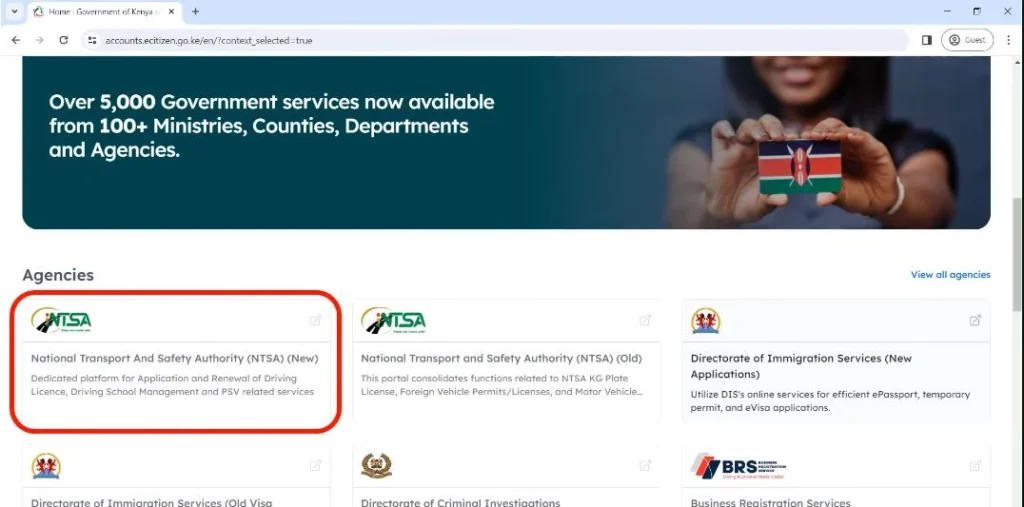
Step 5: Open the New NTSA Portal.
Scroll down to the NTSA services section. You’ll notice two options: NTSA (Old) and NTSA New. Select NTSA New. When prompted, confirm that you are accessing your own account by clicking Continue.
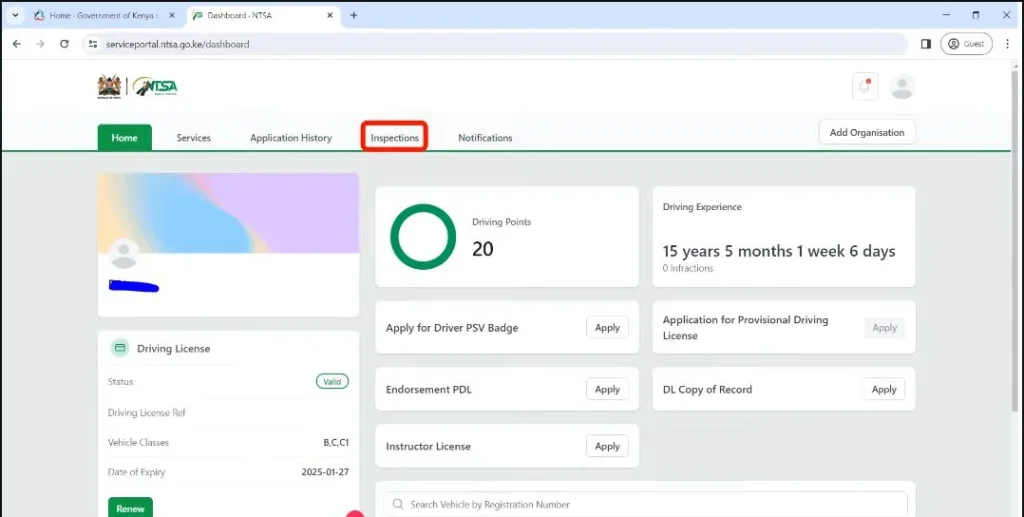
Step 6: Open the Vehicle Inspection Service
Once the NTSA portal opens, you’ll see several menu options at the top of the page, including Home, Services, Application History, Inspections, and Notifications. Click Inspections, then select Apply for Inspection.
Step 7: Select Your Vehicle
If you have more than one vehicle registered under your account, choose the vehicle you want to inspect. The system will display the vehicle’s details. Carefully review the information to ensure everything is correct before proceeding.
Step 8: Select the Inspection Type
Scroll to the bottom of the page and choose the type of inspection you require. For example, if you’re booking the mandatory yearly inspection, select Annual Inspection. After making your selection, click Submit.
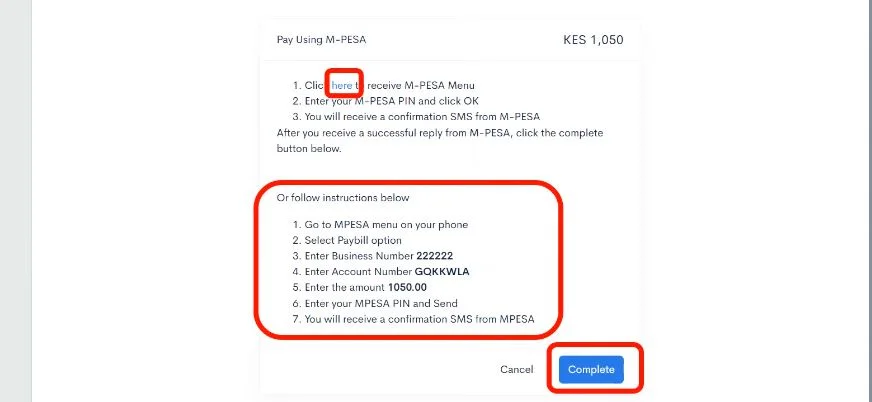
Step 9: Pay the Inspection Fee
You will now be redirected to the payment page. At the time of writing, the annual vehicle inspection fee is KSh 1,050. However, fees may change, so always confirm the latest charges on the NTSA portal before making payment. Choose your preferred payment method, such as M-Pesa, KCB, or any other available payment option.
If you’re paying with M-Pesa, you can either:
- Use the provided Pay Bill details to complete the payment manually from your phone, or
- Select M-Pesa Express (STK Push), enter your phone number, and authorize the payment using your M-Pesa PIN.
Once your payment is successful, click Complete.
Step 10: Download Your Payment Receipt
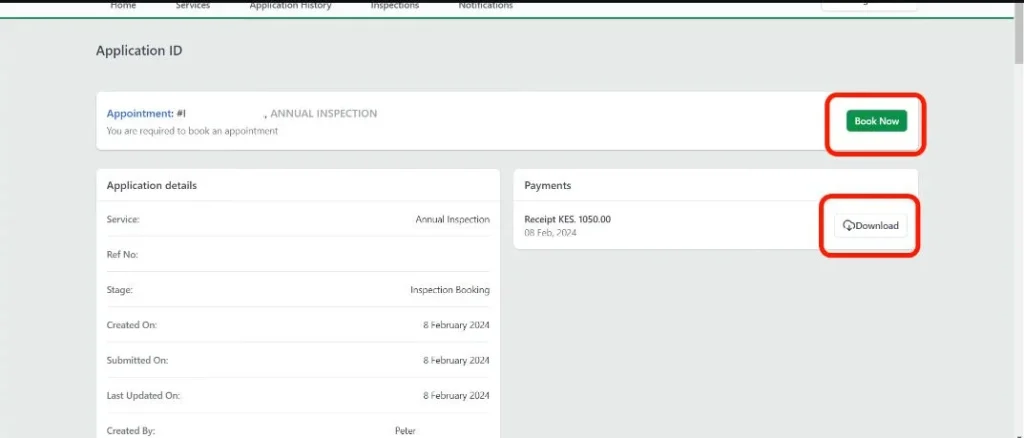
After your payment has been confirmed, download your inspection payment receipt. You can either print it or save a digital copy for future reference. Next, click Book Now to schedule your inspection appointment.
Step 11: Choose an inspection center.
Select the inspection center where you’d like your vehicle to be inspected. Once you’ve selected your preferred center, the booking calendar will appear.
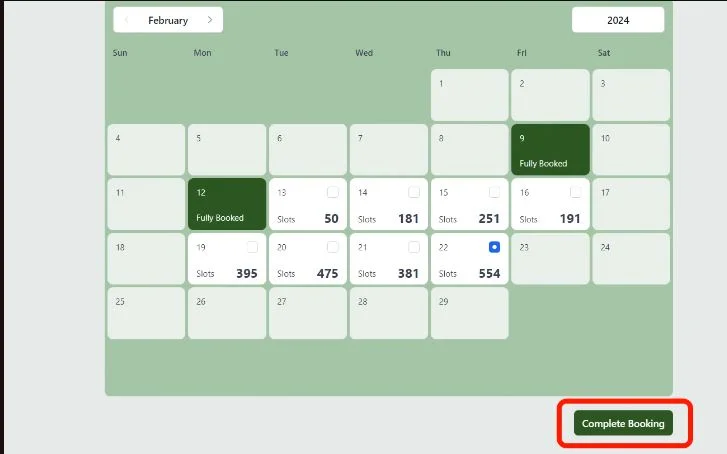
Step 12: Select an Available Inspection Date
Only dates highlighted in white are available for booking. Select your preferred inspection date from the available options. If a date isn’t highlighted, it means there are no available booking slots for that day. After selecting your preferred date, click Complete Booking.
Step 13: Download Your Booking Slip
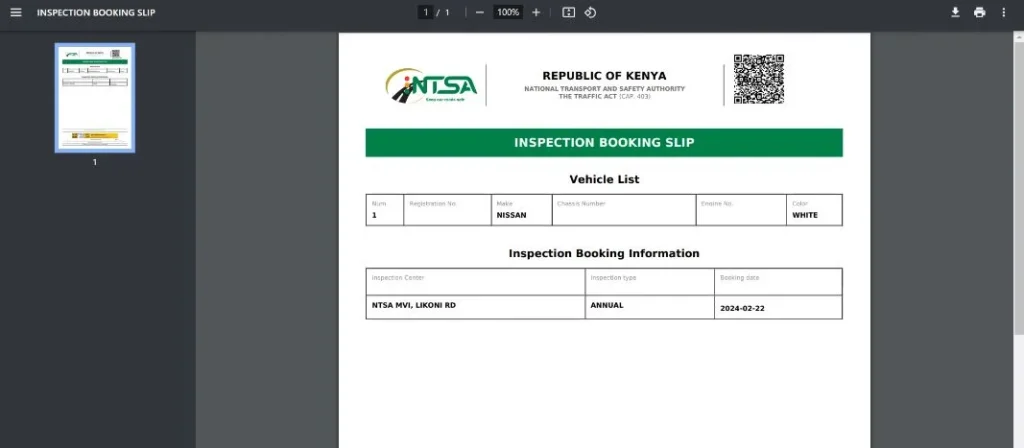
Congratulations! Your vehicle inspection booking is now complete. Download and print your booking slip or save a digital copy on your device. The booking slip contains important information, including your inspection center, appointment date, booking reference, and other inspection details.
Remember to carry the booking slip with you when attending your inspection. If you’re unable to attend on your scheduled date, you can log back into the NTSA portal and reschedule your appointment.
Related Posts
- Withholding Tax Certificate to File Returns
- Using 9 Form to File Returns
- File Nil Returns in Kenya
- Steps to get a Birth Certificate in Kenya
Conclusion
Booking a motor vehicle inspection through the NTSA portal on eCitizen is the fastest and most convenient way to schedule your inspection.
The entire process from paying the inspection fee to selecting an inspection center and booking an appointment can be completed online in just a few minutes.
Before attending your appointment, ensure you have downloaded both your payment receipt and booking slip. Arrive at your selected inspection center on time with your vehicle and any required documents to help ensure a smooth inspection process.
Frequently Asked Questions
How much does motor vehicle inspection booking cost?
Currently, the annual motor vehicle inspection fee is KSh 1,050. It is paid using different payment methods on eCitizen.
What should you carry to the inspection center?
You will need to carry your booking slip, payment receipt, and any documents required for your type of inspection.