
How to File KRA Tax Returns Using Withholding Tax Certificates
If you earned income from consulting or management services and 5% withholding tax was deducted by your client, you are still required to file an annual KRA Income Tax Return through the iTax portal.
Many consultants, freelancers, trainers, advisors, and management professionals are often confused about how to report income shown on withholding tax certificates and claim the withholding tax already paid. This guide explains the entire process step by step. If you encounter any problems, just contact us.
Important: This guide applies to withholding tax deducted from consulting and management services. Interest income from banks, fixed deposits, or qualifying treasury bonds is generally treated as a final tax and does not need to be declared in your annual income tax return.
Related:
Understanding Withholding Tax on Consulting and Management Services
When you provide consulting or management services, your client may deduct 5% withholding tax from your payment and remit it directly to KRA.
This withholding tax is not a final tax. Instead, it acts as an advance tax payment that can be claimed as a tax credit when filing your annual return.
For example, if your gross consulting fee is KES 55,000, the client may deduct KES 2,750 as withholding tax and pay you KES 52,250. For tax purposes, your income remains KES 55,000 and not the net amount received in your bank account.
What you need before you start
Before you start filing your return, make sure you have the below items.
- All withholding tax certificates for the year
- Your KRA PIN and iTax password
- Records of business expenses
- eTIMS-validated invoices (where applicable)
- Supplier PINs for manual Non-eTIMS expenses
- A computer with Microsoft Excel installed
This helps users avoid interruptions during filing.
Step-by-Step Guide to File KRA Tax Returns Using Withholding Tax Certificates
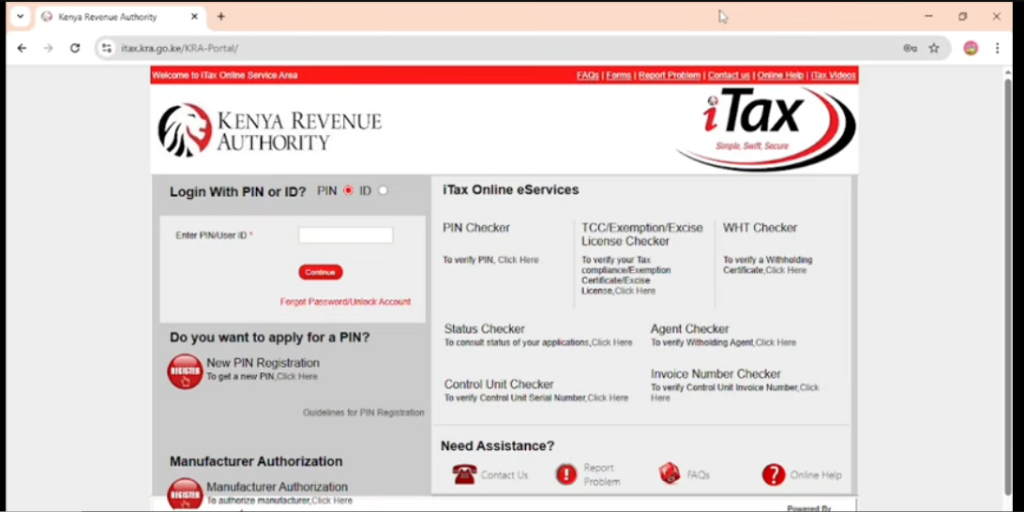
Step 1: Log in to the KRA iTax Portal. Visit the KRA iTax portal and enter your KRA PIN, ID number, and password. Complete the security arithmetic question and click Login. Selecting the correct tax obligation ensures you file the appropriate return and helps prevent filing errors or rejection by the system.
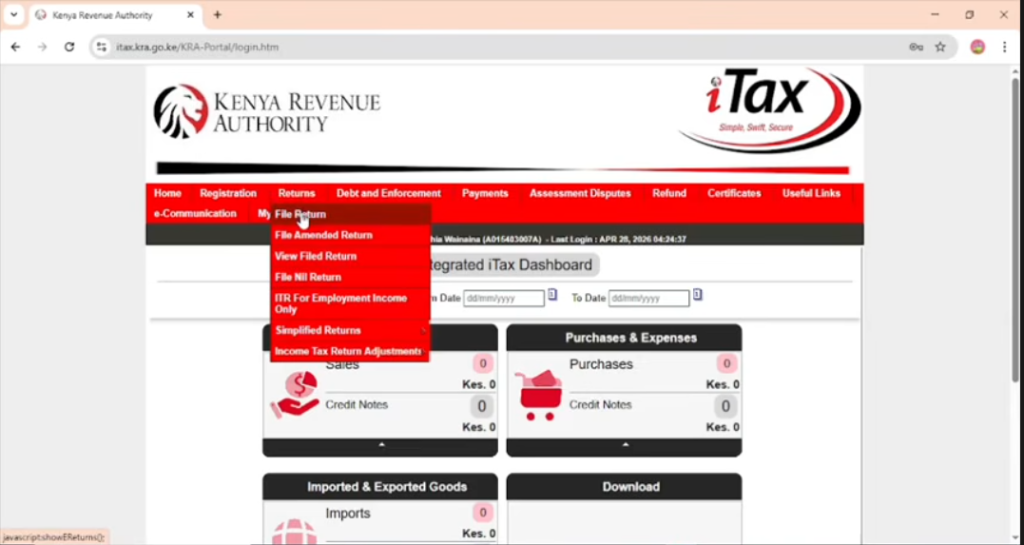
Step 2: Start Filing Your Return. On the iTax dashboard, click Returns and then File Return. Choose Income Tax Resident Individual if you are a Kenyan resident or Income Tax Non-Resident Individual if applicable, then click Next. Selecting the correct return type helps ensure your filing is processed successfully.
Step 3: Select the Return Period. Choose the tax year you are filing for, for example, from 01/01/2026 to 31/12/2026. KRA requires taxpayers to report all income earned during a specific calendar year, so selecting the correct period ensures your return matches the income and withholding tax certificates issued during that year.
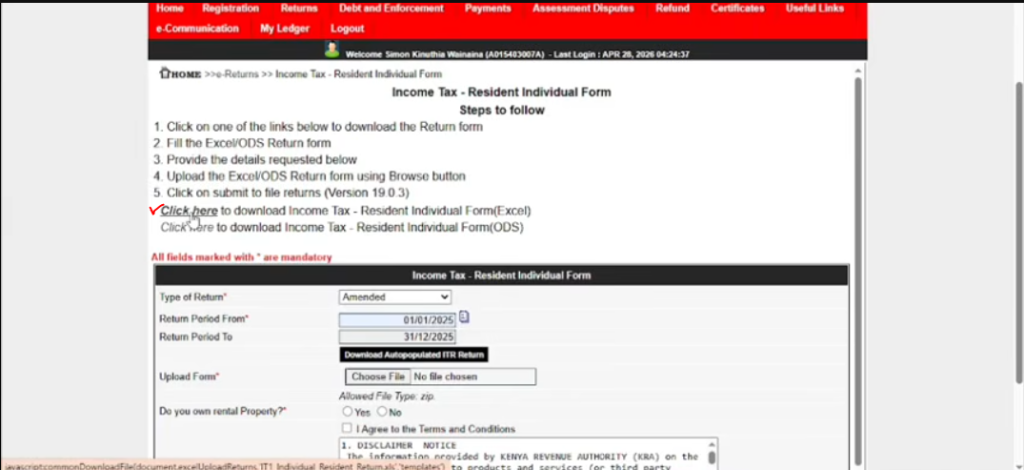
Step 4: Download the Income Tax Return Excel Sheet. If consulting income is your only source of income, download the Income Tax Return Excel Sheet from iTax. Before opening the file, right-click it, select Properties, check Unblock, then click Apply and OK. Download the ZIP file, save it to your computer, extract the contents, open the Excel Return Form, and enable editing if prompted. The Excel workbook is used to prepare, validate, and generate the return file before uploading it to iTax.
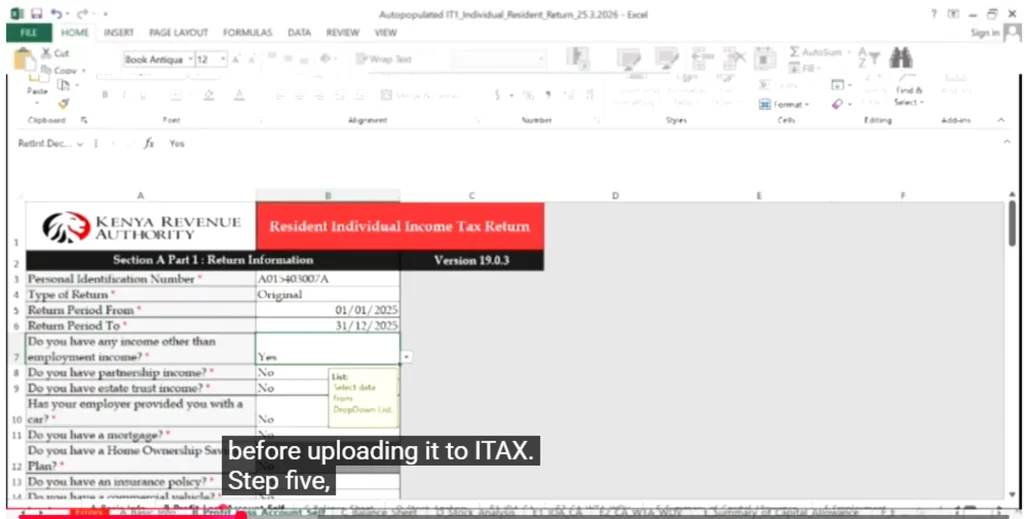
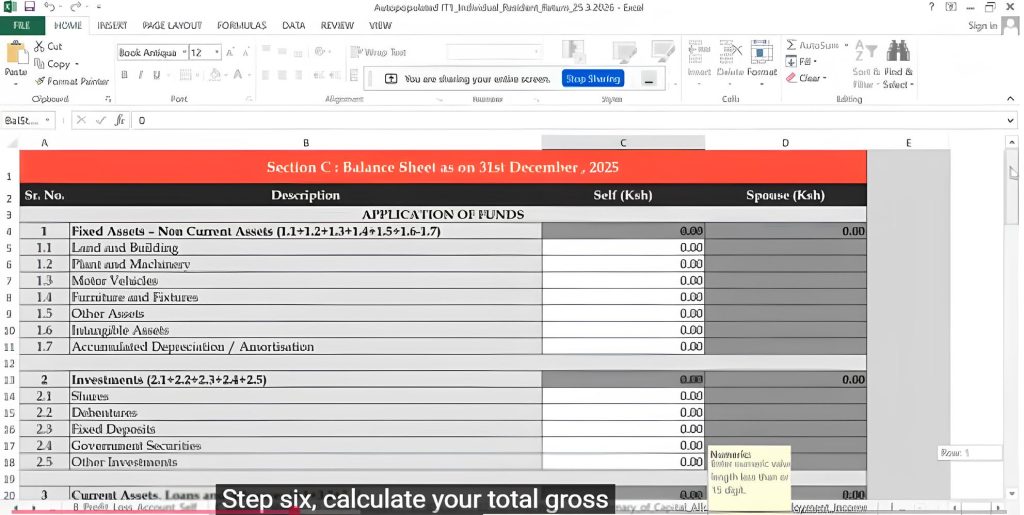
Step 5: Complete the Basic Information Sheet. Enter your KRA PIN, select Original as the return type, and provide the return period start and end dates. When asked whether you have any other income other than employment income, select YES. Consulting and management income is treated as business income rather than employment income. Selecting “Yes” activates additional worksheets, including the Profit & Loss Account, Balance Sheet, and Tax Computation sheets required for reporting business income.
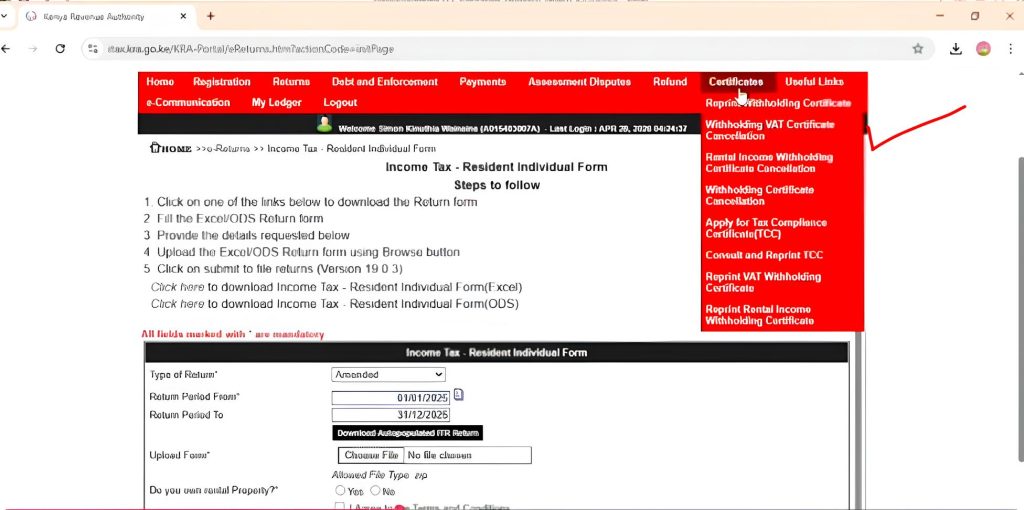
Step 6: Calculate Your Total Gross Income. Log in to iTax and navigate to Certificates, then Reprint Withholding Tax Certificate.
Download all withholding tax certificates for the year and add together the gross income shown on each certificate. You must report the gross income before tax deductions rather than the amount received in your bank account because reporting only the net amount may not match KRA records.
For example, if you received KES 52,250 in January and KES 55,000 per month from February to December, your calculation would be:
55,000 × 11 = 605,000
605,000 + 52,250 = 657,250
Your total gross income would therefore be KES 657,250.
Step 7: Enter Income in the Profit & Loss Account. Open the Profit & Loss worksheet and go to Section 1.2 – Commission Income.
Enter the total gross income, not the amount received after withholding tax. KRA will compare your declared income against what your clients report with the withholding tax certificates they submitted. If you report net amounts instead of the gross amount, you will have income mismatches, incorrect tax computations, or compliance queries.
For example, if your total gross income is KES 657,250, enter KES 657,250 in the Commission Income field. This information is used to determine your business revenue and taxable profit.
Step 8: Claim Business Expenses. Enter all eligible business expenses related to earning your consulting or management income. Examples may include internet costs, office rent, software subscriptions, business travel, office supplies, and communication expenses. KRA generally requires deductible expenses to be validated through eTIMS or TIMS, so it is important to maintain proper records and supporting documentation for all expense claims.
Step 9: Enter Manual Non-eTIMS Expenses in Tax Computation. If you have approved expenses that were not validated through eTIMS, enter the approved amount under Tax Computation Sheet → Manual Non-eTIMS Expenses. These expenses reduce your taxable income and overall tax liability, helping ensure you are taxed only on your actual net business income.
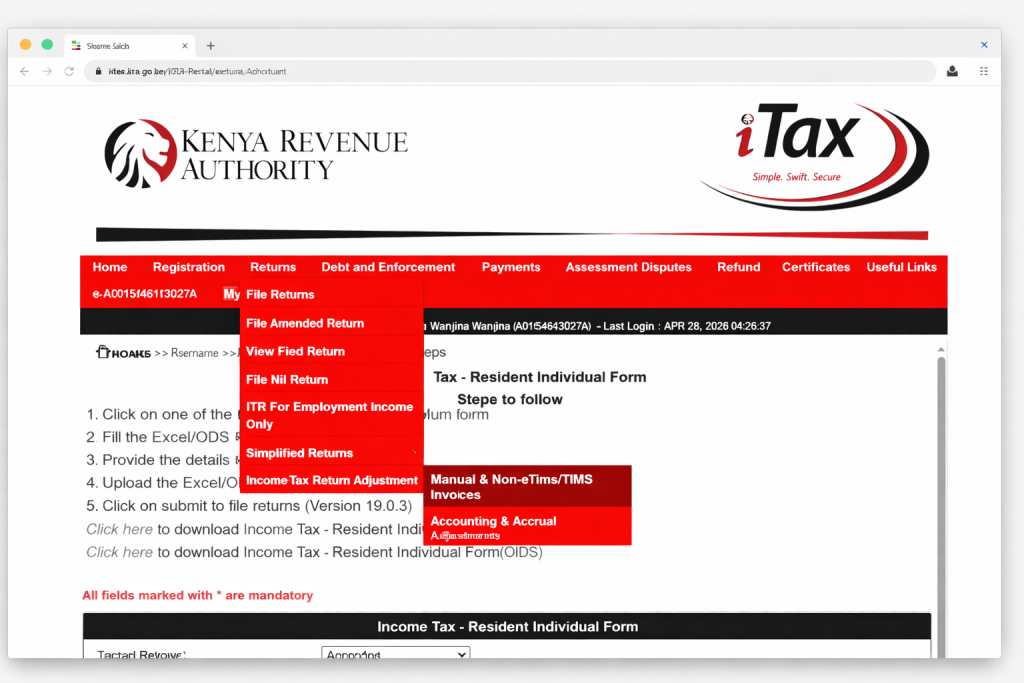
Step 10: Report Manual Non-eTIMS Expenses. If you have valid business receipts that are not eTIMS-generated, go to Returns → Income Tax Return Adjustments → Manual Non-eTIMS Invoices and select the relevant tax year. Download the CSV template and enter the supplier PIN, supplier name, invoice number, invoice date, description, and amount. Save the completed CSV file, combine all supporting receipts into a PDF document, upload both files through the portal, and submit them for KRA review. Once approved, these expenses can be claimed as allowable deductions.
Step 11: Enter Your Withholding Tax Credits. Add together all withholding tax amounts shown on your certificates and enter the total in the Withholding Tax Credit section. The 5% withholding tax deducted by your clients is not a final tax but rather an advance payment that can be used to reduce your overall tax liability.
For example, if KES 2,750 was deducted monthly from February to December and KES 2,613 was deducted in January, your withholding tax credit would be calculated as follows:
2,750 × 11 = 30,250
30,250 + 2,613 = 32,863
Your total withholding tax credit would therefore be KES 32,863. In many cases, validated withholding tax certificates are automatically populated in iTax, but you should always verify that the figures are correct before submission.

Step 12: Complete the Balance Sheet. Open the Balance Sheet worksheet and enter the applicable business assets and liabilities. For simple consulting businesses, this section may include cash balances, equipment, computers, office furniture, business loans, or other obligations. Many taxpayers use nominal values where appropriate to allow validation. Ensure the balance sheet balances correctly and validates successfully before proceeding.
Step 13: Validate the Return. Click Validate and review any errors highlighted by the system. Common validation issues include missing mandatory fields, incomplete balance sheet entries, incorrect dates, and calculation errors. Correct all issues and repeat the validation process until the return validates successfully without errors.
Step 14: Generate the XML File. After successful validation, click Generate XML and then save the XML file. Note its location on your computer for easy access during the upload process. The XML file is the document that will be uploaded to the iTax portal.
Step 15: Upload the XML return to iTax. Return to the iTax portal and navigate to Returns → File Return. Select Income Tax Resident Individual, enter the return period, browse and select the generated XML file, tick the declaration checkbox, and click Submit. After submission, download and save the acknowledgement receipt as proof that your return was successfully filed.
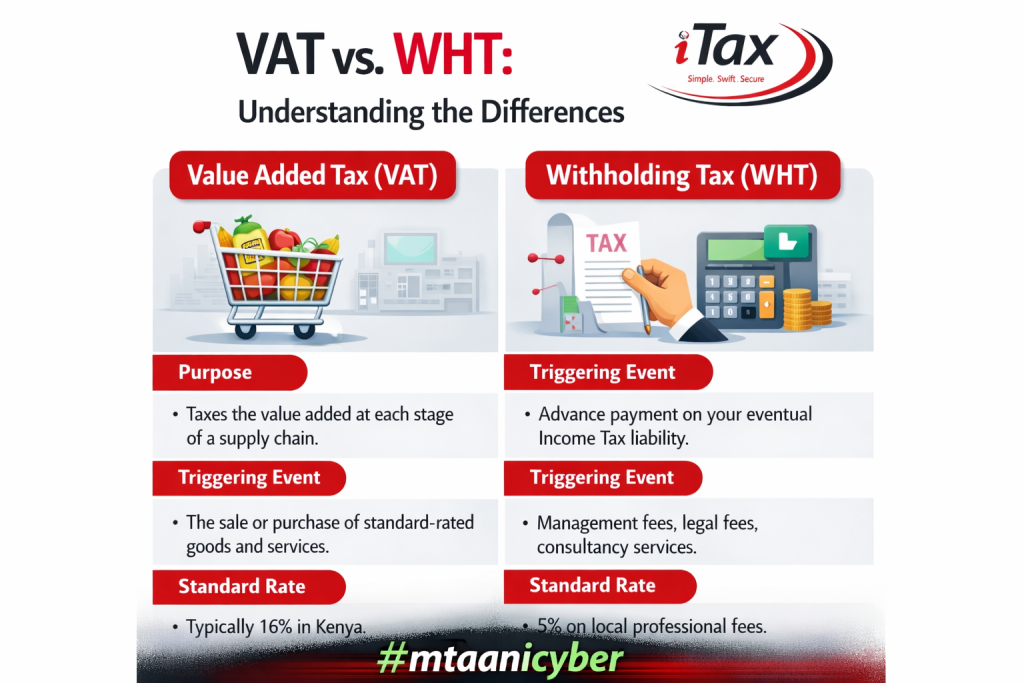
Value Added Tax (VAT) and Withholding tax (WTH)
Common Problems When Filing Using Withholding Tax Certificates
Many taxpayers encounter problems because of simple mistakes. Common errors include reporting net income instead of gross income, forgetting to claim withholding tax credits, ignoring eTIMS requirements, selecting the wrong return type, uploading an unvalidated return, and failing to keep proper records. Maintaining copies of withholding tax certificates, receipts, invoices, XML files, and acknowledgement receipts can help prevent future issues.
- XML file upload failure
- Missing withholding tax certificates
- Missing Certificate on iTax
- Gross income doesn’t match certificates
- eTIMS expenses rejected
- CSV form upload errors
- Validation failure on submission
- Non-balancing Balance sheet
- Negative tax computation
- Positive tax computation
- Lost or Forgotten password
- Wrong tax obligation
Conclusion
Filing a KRA Income Tax Return using withholding tax certificates for consulting and management services is straightforward when you understand the process.
The key is to declare your gross income, claim all eligible withholding tax credits, report allowable business expenses, complete the required worksheets correctly, and validate the return before submission.
By following these steps carefully and keeping proper records throughout the year, you can file your return accurately, remain compliant with KRA requirements, and potentially reduce your overall tax liability.
Frequently Asked Questions
Can I file KRA returns without withholding tax certificates?
If you have good records of your income, you can file your return without the withholding tax certificates. However, you cannot claim the withholding tax credits unless the certificates are issued or the deductions are reflected in your iTax account.
Can you amend my return after submitting it?
Yes. If you discover an error after submission, you can file an amended return through the iTax portal to correct your income, expenses, withholding tax credits, or other details. It is advisable to amend your return as soon as possible.
What is a withholding certificate?
A withholding certificate is a document that proves that a business or client who paid you (the withholder) deducted a portion of your payment at the source and remitted it directly to KRA.
What is the difference between VAT and withholding tax?
When you buy goods, a consumption tax is charged and added to the price of the goods and services. This added value is referred to as the Value Added Tax (VAT). Withholding Tax (WHT), or retention tax, is income tax paid in advance and is deducted directly from when you make payments such as professional fees, dividends, or services offered.
Why is it important to file returns on time?
Accurate filing helps you remain compliant with Kenyan tax laws, maintain reliable tax records, avoid penalties, claim all available deductions and tax credits, obtain tax compliance certificates more easily, and improve your credibility when bidding for contracts and professional opportunities.