
How to File Nil Returns in Kenya (2026 Updated Guide)
In this post you will learn How you can file nil returns, what this means, and who it is best for. Filing nil returns in Kenya is an important annual requirement for many taxpayers, including students, unemployed individuals, and anyone who did not earn taxable income during the year. If you need help with this just contact me or send a WhatsApp message.
This is an easy-to-follow step-by-step guide for unemployed citizens without a P9 form. To file, just log into the KRA iTax portal and click the File Nil Returns option. Choose Tax obligation, then click next. That is it
If you earned zero Kenyan shillings throughout the entire year 2025, this detailed guide will walk you through every step of filing your nil returns successfully using the updated KRA iTax portal.
Related Posts
- Register a Private Limited Company in Kenya
- Fastest way to apply and print a Birth certificate in Kenya
- Register a Business Name in Kenya Step by Step
- File returns if you are employed

Step by Step How you can File Nil Returns in Kenya
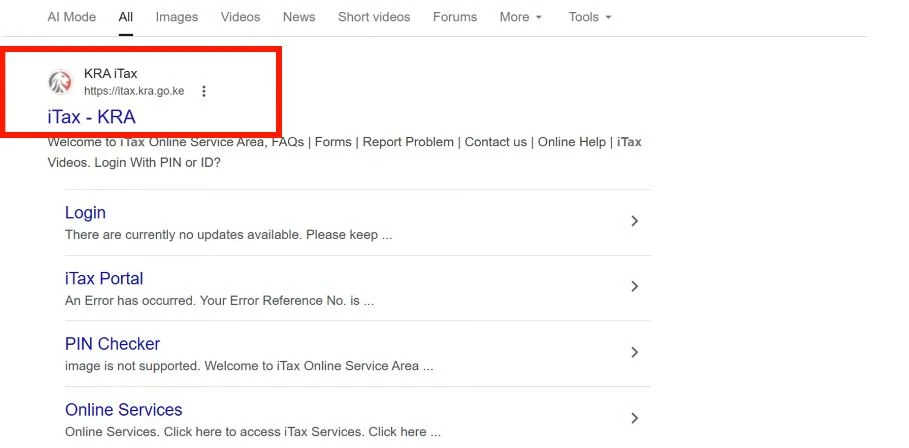
Step 1: Access the KRA iTax Portal
The first step is accessing the KRA iTax portal. Open your preferred web browser and search for KRA iTax, then click on the official portal from the search results. Once the website loads, you will be taken to the login page where you can access your account. KRA now allows taxpayers to log in using either their KRA PIN or National ID number, making it easier to access the system even if you do not remember your PIN immediately.
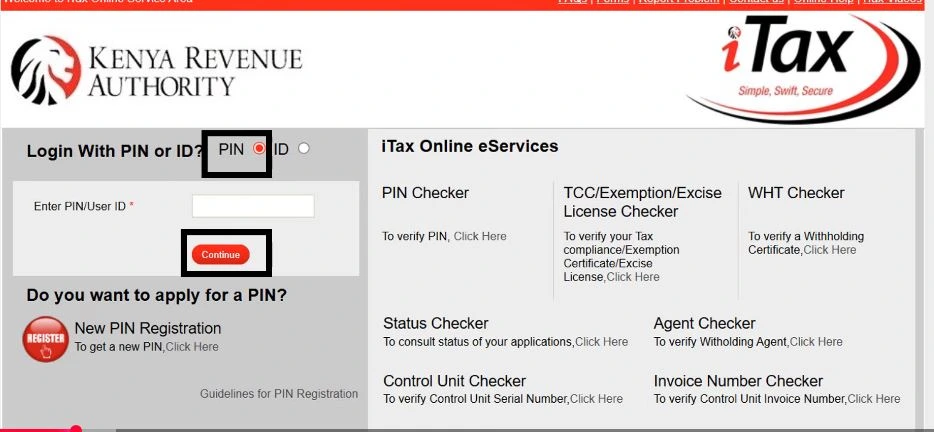
Step 2: Log In Using Your KRA PIN
If you know your KRA PIN, select the PIN option on the login page and enter the number in the provided field. Click Continue and a password field will appear. Enter your iTax password, solve the security arithmetic question, and click Login. Once your credentials are verified, you will be redirected to your taxpayer dashboard, where you can access filing services, payments, and other tax-related functions.
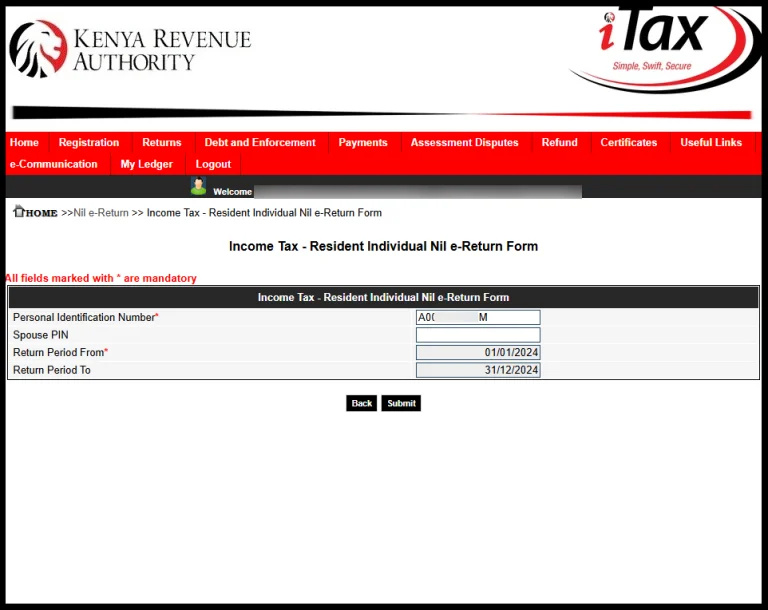
Step 3: Fill In The NILE-Return Form
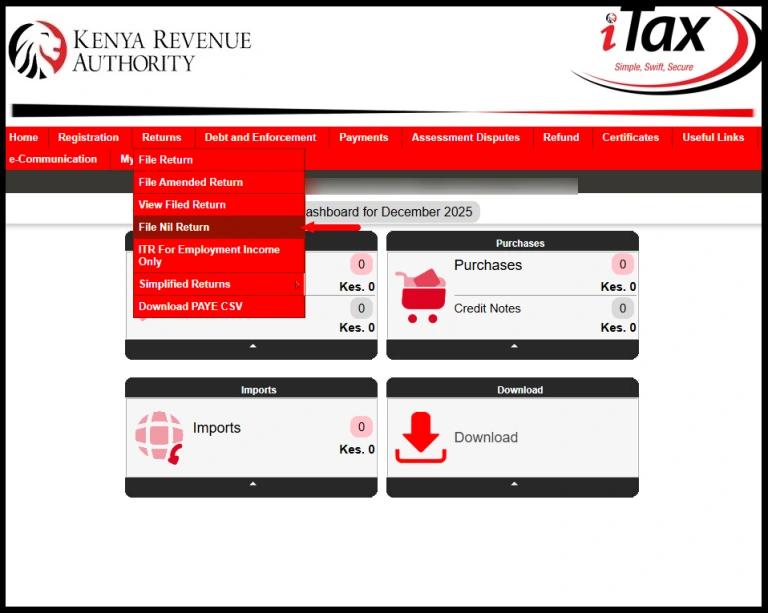
Step 4: Choose the KRA Tax Obligation
Choose “Returns” and then “File Nil Returns” from the drop-down menu. Choose the KRA Tax Obligation, which is Income Tax – Resident Individual, and then proceed.
Step 5: Download e-Return Acknowledgement Receipt
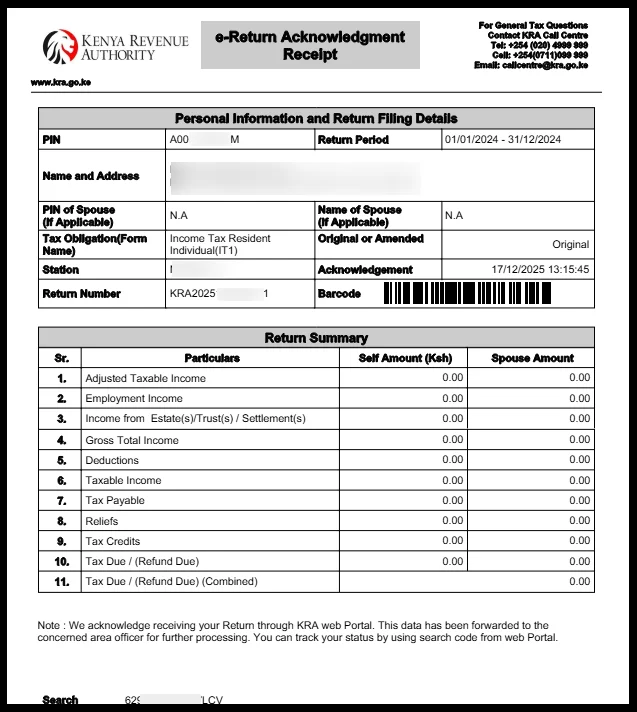
After a successful submission, KRA will automatically generate an e-Return Acknowledgement Receipt. Download and save this document immediately because it serves as proof that your net return was filed successfully.
Review the receipt to confirm that the declared income and tax payable both show KES 0.00. A copy of the acknowledgement receipt will also be sent to your registered email address for future reference.
What Are Nil Returns?
Nil returns are tax returns submitted to KRA indicating that a taxpayer did not earn any taxable income during a specific tax period.
When you file Nil Returns, you are officially informing KRA that you had no employment income, business income, rental income, or any other taxable earnings during the year.
Many Kenyans who are unemployed, students, recent graduates, or individuals without active income sources are required to file nil returns annually to remain compliant with tax regulations. Failure to file NIL returns can lead to penalties even if you earned no income.
Why Filing Nil Returns Is Important
Many people mistakenly assume that if they do not have a job or business, they do not need to interact with KRA. This is incorrect.
Filing nil returns helps maintain an active tax compliance status. It may also be necessary when applying for:
- Tax Compliance Certificates
- Government tenders
- Job applications
- Loan applications
- Business registration processes
- Professional licensing requirements
Understanding the New KRA iTax Changes
One of the biggest changes introduced by KRA is the removal of the traditional one-click Nil Returns filing option for many users.
Previously, taxpayers could simply
- Log into iTax.
- Select File Nil Returns.
- Confirm zero income.
- Submit.
The new system now encourages taxpayers to download an auto-populated income tax return form and verify the information before submission.
This means taxpayers must ensure that all income fields reflect KES 0.00 if they genuinely earned no income during the tax year. The update also includes new login options and additional account recovery features designed to improve accessibility.
Frequently Asked Questions
Can I file Nil Returns if I earned some income during the year?
No. Nil returns should only be filed if your taxable income for the entire year was zero.
Do students need to file Nil Returns?
Yes. If a student has a KRA PIN and earned no taxable income, filing Nil Returns may still be required.
What is a P9 Form?
A P9 form is a document from your employer showing your annual salary, PAYE deductions, and tax reliefs. It is required when filing an Income Tax Return on the KRA iTax portal.