
How to Get Started with Shule Pro School Management System
This guide explains how to get started with Shule Pro School Management System, complete the payment process, submit your school details, and receive your login credentials.
Shule Pro helps schools manage important information through a centralized digital platform. To start using the system for your school, you will need to complete the signup and account activation process.
- Visit the Shule Pro page. Click Sign Up
- Choose a payment method Complete the payment
- Open the WhatsApp button
- Send your name, school name, and payment confirmation code
- Wait for verification Receive your username and password
- Log in to Shule Pro
How to Get Shule Pro School Management System
Getting started with Shule Pro involves a few simple steps. Before registering, you can visit the main Shule Pro School Management System page to learn more about the platform and its available features.
Visit the Shule Pro Page and Click Sign Up
Start by visiting the Shule Pro School Management System page. Review the information about the system and, when you are ready to get started, click the Sign Up button.
You will then be directed to the next stage of the registration process.
Choose Your Payment Method and Complete Payment
After clicking Sign Up, select your preferred payment method and provide the required payment details. If you choose M-Pesa, follow the payment prompts and enter your M-Pesa PIN to authorize the transaction.
Ensure that the payment is completed successfully before proceeding. Once the transaction has been processed, you will be redirected to a confirmation page.
Contact Shule Pro Through WhatsApp
After successful payment, a confirmation landing page will appear with a prominent WhatsApp button. Click the button to contact the Shule Pro team and provide the information required to process your account.
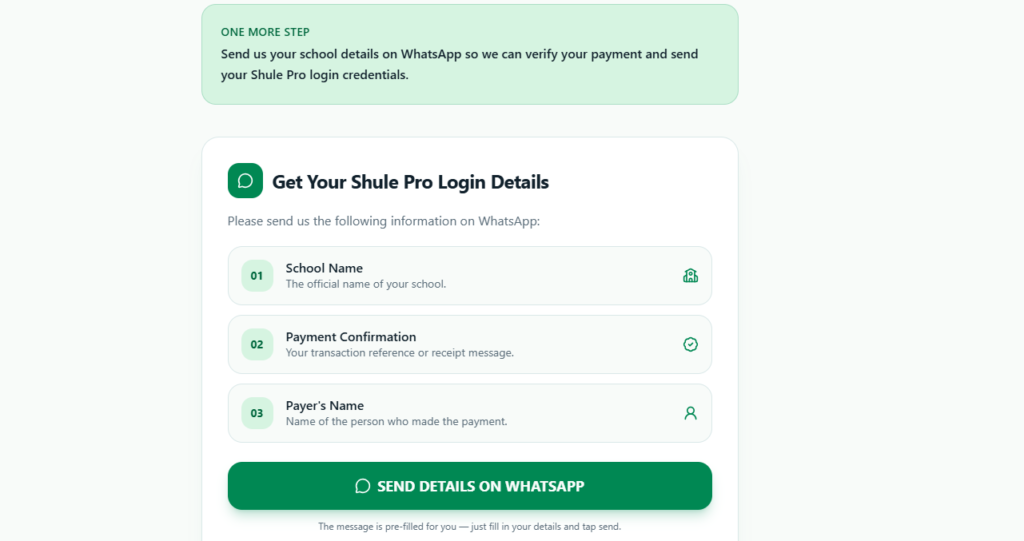
Send the following details:
- Your name
- School name
- Payment confirmation code
The payment confirmation code helps verify your transaction and connect the payment to your school registration.
Receive Your Shule Pro Login Details
After your payment and submitted information have been verified, your account will be processed. You will receive your
- Username
- Password
These credentials will allow you to access the Shule Pro School Management System.
Keep your login information secure and only share access with authorized members of your school.
What You Need Before Signing Up
Before starting the registration process, it is helpful to have the required information ready.
You should have:
- Your name
- Your school name
- A preferred payment method
- The required payment details
- Your payment confirmation code
- A WhatsApp-enabled phone
Preparing this information in advance can make the registration process faster and easier.
How Many Users Can Access Shule Pro?
Shule Pro is currently in its starting stages and supports 3 email users.
All three users have equal access and capabilities within the current version of the system. This means there are currently no different user levels or separate permissions between the available accounts.
The three accounts can be used by authorized members of the school who are responsible for managing information within the system.
Can Shule Pro Handle More Than 700 Students?
Yes. Shule Pro can comfortably accommodate schools with more than 700 students. The number of students supported by the system is separate from the number of users who can access it. This means that a school with a large student population can use the available user accounts to manage information within the system.
The current version supports 3 email users, and all users have equal access and capabilities.
What Happens After Payment?
After successfully completing your payment, you will be taken to a confirmation page.
From there, click the WhatsApp button and send your name, school name, and payment confirmation code. This information is used to verify your payment and process your account.
Once the account has been processed, you will receive your username and password for accessing Shule Pro.
Get Started With Shule Pro
Getting started with Shule Pro is simple:
Visit the Shule Pro Page → Click Sign Up → Complete Payment → Contact the Team Through WhatsApp → Receive Your Login Details
Once your payment has been verified and your account has been processed, you will receive the credentials needed to access the Shule Pro School Management System.
Frequently Asked Questions
How do I get Shule Pro?
Visit the Shule Pro School Management System page, click Sign Up, and complete the required payment. After payment, use the WhatsApp button on the confirmation page to submit your name, school name, and payment confirmation code.
Can Shule Pro accommodate over 700 students?
Yes. The system can comfortably accommodate more than 700 students.
How do I receive my login details?
After your payment and registration details have been verified, you will receive a username and password for accessing the system.